一、前言
在 《Spring-Boot-shiro权限控制》 中,当用户访问没有权限的资源时,我们采取的做法是跳转到403页面,但在实际项目中更为常见的做法是只显示当前用户拥有访问权限的资源链接。配合Thymeleaf中的Shiro标签可以很简单的实现这个目标。
实际上Thymeleaf官方并没有提供Shiro的标签,我们需要引入第三方实现,地址为 https://github.com/theborakompanioni/thymeleaf-extras-shiro 。
1
2
3
4
5
6
| <!-- https://mvnrepository.com/artifact/com.github.theborakompanioni/thymeleaf-extras-shiro -->
<dependency>
<groupId>com.github.theborakompanioni</groupId>
<artifactId>thymeleaf-extras-shiro</artifactId>
<version>2.0.0</version>
</dependency>
|
三、ShiroConfig配置
引入依赖后,需要在ShiroConfig中配置该方言标签:
1
2
3
4
| @Bean
public ShiroDialect shiroDialect() {
return new ShiroDialect();
}
|
四、首页改造
更改index.html,用于测试Shiro标签的使用:
1
2
3
4
5
6
7
8
9
10
11
12
13
14
15
16
17
18
19
| <!DOCTYPE html>
<html xmlns:th="http://www.thymeleaf.org"
xmlns:shiro="http://www.pollix.at/thymeleaf/shiro" >
<head>
<meta charset="UTF-8">
<title>首页</title>
</head>
<body>
<p>你好![[${user.userName}]]</p>
<p shiro:hasRole="admin">你的角色为超级管理员</p>
<p shiro:hasRole="test">你的角色为测试账户</p>
<div>
<a shiro:hasPermission="user:user" th:href="@{/user/list}">获取用户信息</a>
<a shiro:hasPermission="user:add" th:href="@{/user/add}">新增用户</a>
<a shiro:hasPermission="user:delete" th:href="@{/user/delete}">删除用户</a>
</div>
<a th:href="@{/logout}">注销</a>
</body>
</html>
|
值得注意的是,在html页面中使用Shiro标签需要给html标签添加xmlns:shiro="http://www.pollix.at/thymeleaf/shiro"。
五、测试
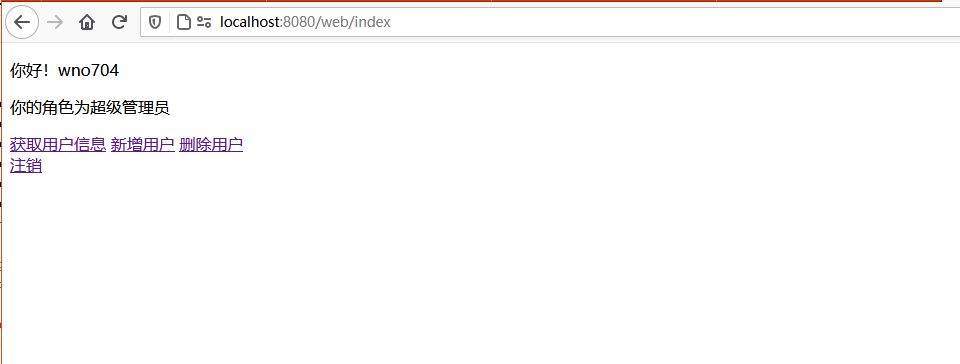
启动项目,使用wno704(角色为admin,具有user:user,user:add,user:delete权限)账户登录:
![]()
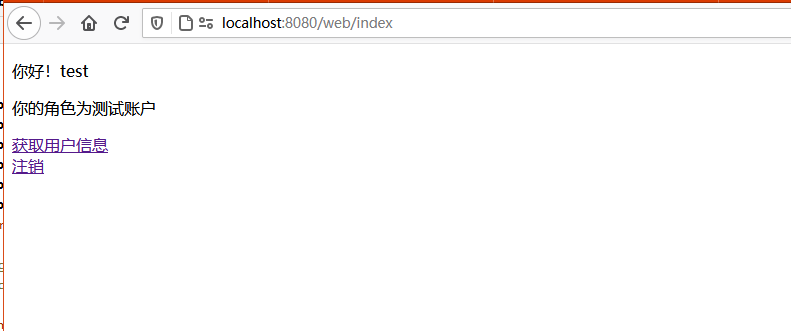
使用test(角色为test,仅有user:user权限)账户登录:
![]()
六、更多标签
6.1 Attribute
1
2
3
| <p shiro:anyTag>
Goodbye cruel World!
</p>
|
6.2 Element
1
2
3
| <shiro:anyTag>
<p>Hello World!</p>
</shiro:anyTag>
|
6.3 The guest tag
1
2
3
| <p shiro:guest="">
Please <a href="login.html">Login</a>
</p>
|
6.4 The user tag
1
2
3
| <p shiro:user="">
Welcome back John! Not John? Click <a href="login.html">here<a> to login.
</p>
|
6.5 The authenticated tag
1
| <a shiro:authenticated="" href="updateAccount.html">Update your contact information</a>
|
6.6 The notAuthenticated tag
1
2
3
| <p shiro:notAuthenticated="">
Please <a href="login.html">login</a> in order to update your credit card information.
</p>
|
6.7 The principal tag
1
| <p>Hello, <span shiro:principal=""></span>, how are you today?</p>
|
or
1
| <p>Hello, <shiro:principal/>, how are you today?</p>
|
6.8 The hasRole tag
1
| <a shiro:hasRole="administrator" href="admin.html">Administer the system</a>
|
6.9 The lacksRole tag
1
2
3
| <p shiro:lacksRole="administrator">
Sorry, you are not allowed to administer the system.
</p>
|
6.10 The hasAllRoles tag
1
2
3
| <p shiro:hasAllRoles="developer, project manager">
You are a developer and a project manager.
</p>
|
6.11 The hasAnyRoles tag
1
2
3
| <p shiro:hasAnyRoles="developer, project manager, administrator">
You are a developer, project manager, or administrator.
</p>
|
6.12 The hasPermission tag
1
| <a shiro:hasPermission="user:create" href="createUser.html">Create a new User</a>
|
6.13 The lacksPermission tag
1
2
3
| <p shiro:lacksPermission="user:delete">
Sorry, you are not allowed to delete user accounts.
</p>
|
6.14 The hasAllPermissions tag
1
2
3
| <p shiro:hasAllPermissions="user:create, user:delete">
You can create and delete users.
</p>
|
6.15 The hasAnyPermissions tag
1
2
3
| <p shiro:hasAnyPermissions="user:create, user:delete">
You can create or delete users.
</p>
|