一、前言
Spring Security默认的退出登录URL为/logout,退出登录后,Spring Security会做如下处理:
1.是当前的Sesion失效;
2.清除与当前用户关联的RememberMe记录;
3.清空当前的SecurityContext;
4.重定向到登录页。
Spring Security允许我们通过配置来更改上面这些默认行为。
二、自定义退出登录行为
2.1 Security配置改造
我们在Spring Security配置中添加如下配置:
1
2
3
4
5
6
7
8
9
10
11
12
13
14
15
16
17
18
19
20
21
22
23
24
25
| @Override
protected void configure(HttpSecurity http) throws Exception {
http.addFilterBefore(smsCodeFilter, UsernamePasswordAuthenticationFilter.class) // 添加短信验证码校验过滤器
.formLogin() // 表单登录
// http.httpBasic() // HTTP Basic
//.loginPage("/login.html")
.loginPage("/authentication/require") // 登录跳转 URL
.loginProcessingUrl("/login")
.successHandler(authenticationSucessHandler) // 处理登录成功
.failureHandler(authenticationFailureHandler) // 处理登录失败
.and()
.logout()
.logoutUrl("/signout")
.logoutSuccessUrl("/signout/success")
.deleteCookies("JSESSIONID")
.and()
.authorizeRequests() // 授权配置
//.antMatchers("/login.html").permitAll()
.antMatchers("/authentication/require", "/login.html",
"/code/sms", "/signout/success").permitAll() // 登录跳转 URL 无需认证
.anyRequest() // 所有请求
.authenticated() // 都需要认证
.and().csrf().disable()
.apply(smsAuthenticationConfig); // 将短信验证码认证配置加到 Spring Security 中;
}
|
上面配置了退出登录的URL为/signout,退出成功后跳转的URL为/signout/success,退出成功后删除名称为JSESSIONID的cookie。/signout/success添加到免认证路径里。
2.2 增加退出登录成功的Controller
在Controller中添加和/signout/success对应的方法:
1
2
3
4
| @GetMapping("/signout/success")
public String signout() {
return "退出成功,请重新登录";
}
|
2.3 测试
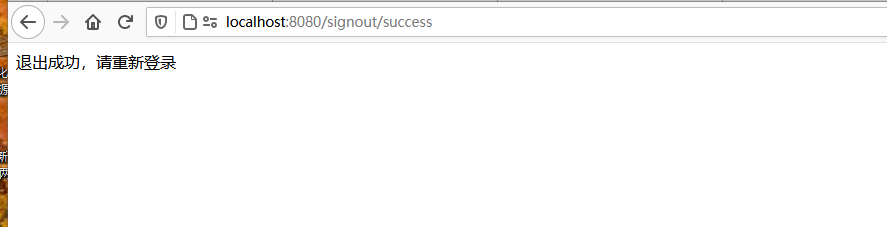
启动项目,登录后访问/signout
![]()
可看到退出成功,并且请求重定向到了/signout/success。
三、logoutSuccessHandler
除了指定logoutUrl外,我们也可以通过logoutSuccessHandler指定退出成功处理器来处理退出成功后的逻辑:
3.1 新增logoutSuccessHandler
MyLogOutSuccessHandler实现LogoutSuccessHandler:
1
2
3
4
5
6
7
8
9
| @Component
public class MyLogOutSuccessHandler implements LogoutSuccessHandler {
@Override
public void onLogoutSuccess(HttpServletRequest httpServletRequest, HttpServletResponse httpServletResponse, Authentication authentication) throws IOException, ServletException {
httpServletResponse.setStatus(HttpStatus.UNAUTHORIZED.value());
httpServletResponse.setContentType("application/json;charset=utf-8");
httpServletResponse.getWriter().write("退出成功,请重新登录~");
}
}
|
3.2 Security配置改造
1
2
3
4
5
6
7
8
9
10
11
12
13
14
15
16
17
18
19
20
21
22
23
24
25
26
27
28
29
| @Autowired
private MyLogOutSuccessHandler logOutSuccessHandler;
@Override
protected void configure(HttpSecurity http) throws Exception {
http.addFilterBefore(smsCodeFilter, UsernamePasswordAuthenticationFilter.class) // 添加短信验证码校验过滤器
.formLogin() // 表单登录
// http.httpBasic() // HTTP Basic
//.loginPage("/login.html")
.loginPage("/authentication/require") // 登录跳转 URL
.loginProcessingUrl("/login")
.successHandler(authenticationSucessHandler) // 处理登录成功
.failureHandler(authenticationFailureHandler) // 处理登录失败
.and()
.logout()
.logoutUrl("/signout")
//.logoutSuccessUrl("/signout/success")
.logoutSuccessHandler(logOutSuccessHandler)
.deleteCookies("JSESSIONID")
.and()
.authorizeRequests() // 授权配置
//.antMatchers("/login.html").permitAll()
.antMatchers("/authentication/require", "/login.html",
"/code/sms", "/signout/success").permitAll() // 登录跳转 URL 无需认证
.anyRequest() // 所有请求
.authenticated() // 都需要认证
.and().csrf().disable()
.apply(smsAuthenticationConfig); // 将短信验证码认证配置加到 Spring Security 中;
}
|
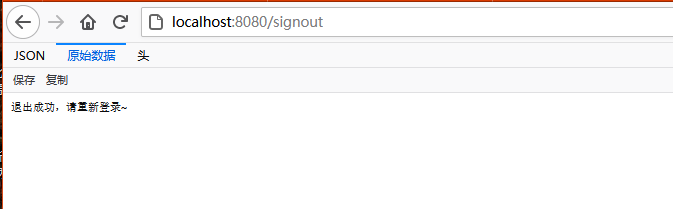
3.3 测试
效果和上面一样:
![]()